 AGENCY


Best overall: Harvest. Best for agency-wide profitability: Productive. Best for flexible time reporting: Toggl Track. Best for straightforward timesheets: Clockify. Best for automatic time capture: Timely. These are the best time tracking tools for agencies to shortlist in 2026, organized by the operational problem you need to fix.
- Harvest is the default choice for agencies connecting time tracking, project budgets, and invoicing.
- Productive is best for agency profitability management that connects delivery, budgets, and resource planning.
- Toggl Track suits flexible reporting; Clockify suits straightforward timesheets; Timely suits automatic time capture.
- The best time tracking tools for agencies support project profitability decisions, not just hour collection.
Why this matters
A full calendar does not prove your agency is profitable. Time tracking shows where delivery hours go; profitability analysis connects those hours to labor costs, project revenue, and scope.
Your tool should help you answer a harder question than whether everyone worked today: Which work deserves more capacity, and which work needs a different scope? A timer cannot make that decision for you.
Agency Builders Membership offers coaching, masterminds, and in-person retreats for digital and creative agency owners. Agency Builders Membership is best for agency owners who want coaching and peer accountability alongside time tracking software. It is a membership community, not a replacement for the tools below.
What makes the best time tracking tools for agencies?
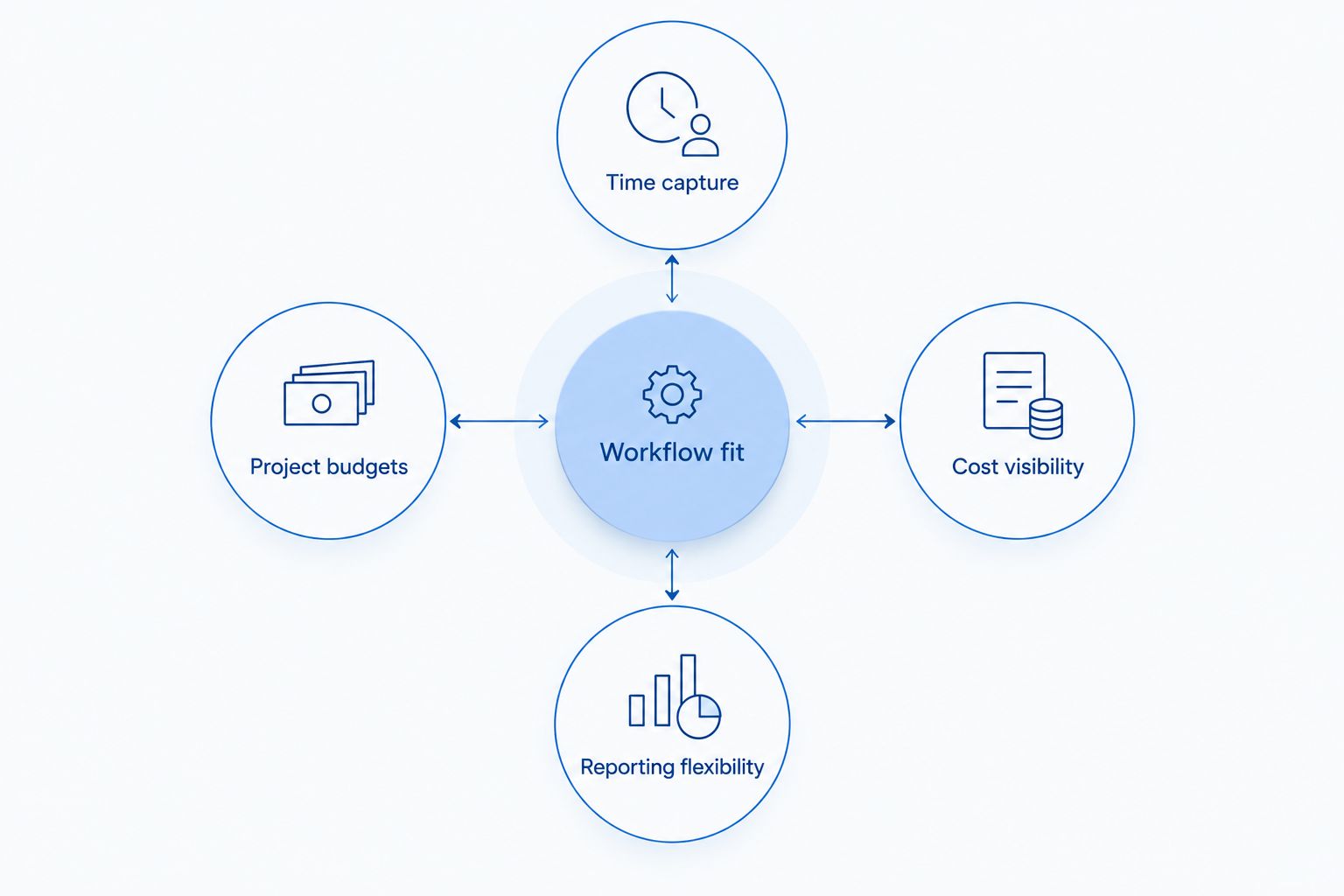
For this 2026 shortlist, evaluate five criteria before you compare features. A tool that wins on convenience but loses on project visibility solves only half the problem.
- Time capture: Your team needs a practical way to record client work, internal work, and nonbillable delivery time. Choose manual timers, timesheets, or automatic capture deliberately.
- Project budgets: You need to compare actual delivery effort with the hours or fees you planned. A report after the engagement ends comes too late to correct scope.
- Cost visibility: Billable value and profit are different. Check whether the workflow accounts for labor costs or requires a separate calculation.
- Reporting flexibility: Owners, delivery leads, and account managers need different views. Look for useful breakdowns by client, project, person, and task.
- Workflow fit: A tool should match how you sell and deliver work. Retainers, fixed-scope projects, and hourly engagements need different interpretations of the same time data.
Ask each vendor to demonstrate your actual delivery model. A polished sample dashboard does not establish that your project structure, cost assumptions, and reporting needs fit.
Agency time tracking tools at a glance
This comparison separates focused time tracking from broader agency operations. The distinction matters: buying more software does not automatically give you better financial decisions.
| Tool | Best for | Standout feature | Key limitation |
|---|---|---|---|
| Harvest | Time tracking connected to billing | Time, project budgets, and invoicing in one workflow | Not a complete agency operations or accounting system |
| Productive | Agency-wide profitability management | Connected budgeting, time tracking, and resource planning | Requires broader operational setup than a standalone timer |
| Toggl Track | Flexible time reporting | Time entries organized through projects, clients, and tags | Broader delivery operations need separate workflows |
| Clockify | Straightforward team timesheets | Timer and timesheet workflows with project reporting | Recording hours alone does not establish project profit |
| Timely | Automatic time capture | A private activity timeline that supports timesheet creation | Captured activity still needs project assignment and review |
The recommendations below concern workflow fit in 2026, not a claim that every feature appears in every subscription. Confirm the required functionality before you commit.
1. Harvest: best time tracking tool for billing-led agencies
Harvest connects time tracking with project budgets, reporting, and invoicing. It suits an agency that wants delivery hours to feed a clear billing workflow without adopting a full agency operations platform.
Harvest is the default choice when your main problem is connecting recorded work to client billing. Keep the distinction clear: invoicing and budget tracking do not replace a full profit-and-loss view.
Harvest pros:
- Connects recorded time with invoicing instead of leaving billing entirely separate.
- Supports project budget tracking alongside delivery activity.
- Provides project and team reporting for reviewing how hours are distributed.
Harvest cons:
- Broader resource planning and agency financial management require additional workflows.
- Reports depend on consistent project setup and accurate time entries.
Best for: Agencies with an established delivery process that need tighter time-to-billing discipline.
During evaluation, use a real engagement rather than a sample project. Check whether a delivery lead can see effort against budget and whether the billing owner can interpret the same records without rebuilding them.
Verdict: Buy Harvest if time-to-billing is the bottleneck. Hold if you need agency-wide operational planning in the same system.
2. Productive: best profitability tool for connected agency operations
Productive brings time tracking, budgeting, resource planning, and profitability reporting into an agency-focused platform. Its role is broader than recording hours: it connects delivery activity with the operational context behind that activity.
Productive is the strongest fit on this shortlist when disconnected budgets, staffing plans, and time records are the problem. Treat implementation as an operations decision, not a timer replacement.
Productive pros:
- Connects time tracking with project budgets and profitability reporting.
- Includes resource planning alongside delivery and financial information.
- Gives agencies a way to manage related operational processes within one platform.
Productive cons:
- Broader functionality requires more setup and process ownership than a focused time tracker.
- Incomplete budgets or outdated cost assumptions weaken the usefulness of profitability reporting.
Best for: Agencies ready to connect delivery planning, staffing, and project financial management.
Before choosing Productive in 2026, define who owns budgets, labor cost assumptions, and resource assignments. If nobody maintains those inputs, the reporting layer cannot repair the underlying process.
Test a project that includes internal time, client delivery, and a scope change. Your evaluation should show how the operational picture changes as work progresses, not just whether people can start a timer.
Verdict: Buy Productive for connected agency operations. Wait if your team has not assigned ownership of the financial inputs.
3. Toggl Track: best time tracking tool for flexible reporting
Toggl Track records work through timers and time entries, with projects, clients, and tags providing reporting structure. It suits teams that want focused time tracking without making the tracking tool their entire delivery system.
The strength is flexibility. The risk is also flexibility: inconsistent naming and tagging make related work harder to compare.
Toggl Track pros:
- Supports a focused time tracking workflow rather than requiring a broader operations rollout.
- Uses projects, clients, and tags to organize recorded work.
- Provides reporting for examining how time is distributed.
Toggl Track cons:
- Broader project delivery and financial processes need separate workflows.
- Flexible categorization needs shared rules to prevent inconsistent reporting.
Best for: Agencies that already have project management in place and want adaptable time reporting alongside it.
Write your reporting questions before designing your tags. For example, distinguishing client delivery from internal work is useful only if everyone applies that distinction consistently.
Do not create a category for every possible activity. Start with categories tied to decisions: scope control, capacity, billing, and internal investment.
Verdict: Buy Toggl Track for focused, flexible reporting. Skip it as a substitute for a complete agency profitability workflow.
4. Clockify: best time tracking tool for straightforward timesheets
Clockify supports timers, timesheets, and project-based time reporting. It fits agencies that need a clear record of who worked on which engagement before they attempt more complex profitability analysis.
Clockify is a practical starting point when the immediate problem is missing or inconsistent timesheets. Establish reliable records first, then connect those records to your financial model.
Clockify pros:
- Supports both timer-based recording and timesheet entry.
- Organizes tracked work by project for review and reporting.
- Provides a focused foundation for team time-recording discipline.
Clockify cons:
- A record of hours is not a complete calculation of agency profit.
- Manual entry workflows still require timely review and correction.
Best for: Agencies whose first priority is consistent team timesheets and clear project-hour records.
For a 2026 rollout, define what counts as client work, internal work, and nonbillable client support. Record revisions and delivery meetings, not just the tasks that appear on an invoice.
Use the resulting records to examine where your original scope assumptions diverge from actual delivery. A timesheet is useful evidence, but somebody still has to act on it.
Verdict: Buy Clockify to establish timesheet discipline. Hold if you need connected financial planning as the primary capability.
5. Timely: best time tracking tool for automatic capture
Timely uses automatic activity capture to create a private timeline that helps users prepare time records. It suits agency work that moves between applications and is difficult to reconstruct from memory.
Timely is the best fit here when forgotten activity is the main obstacle to accurate timesheets. Automatic capture assists the record; it does not decide which client or project should receive the time.
Timely pros:
- Captures activity automatically to support time-record reconstruction.
- Gives users a private timeline to review before creating timesheet entries.
- Reduces reliance on remembering every work interval at the end of the day.
Timely cons:
- Captured activity still needs interpretation and correct project assignment.
- Teams need to understand the capture workflow and review the relevant privacy settings.
Best for: Agencies whose staff regularly forget timers or struggle to reconstruct fragmented delivery work.
During evaluation, check how your team turns captured activity into a usable project record. The deciding question is whether review becomes easier without losing accurate client attribution.
Explain the workflow before rollout. Your goal is reliable delivery information, not an unexplained monitoring process that distracts from the work.
Verdict: Buy Timely for assisted time reconstruction. Skip it if automatic capture does not address your team's actual recording problem.
How we ranked these tools
The ranking uses the five criteria above: time capture, project budgets, cost visibility, reporting flexibility, and workflow fit. It prioritizes distinct agency use cases rather than treating every tool as interchangeable.
Harvest leads as the default time-and-billing choice. Productive takes the connected-operations slot; Toggl Track, Clockify, and Timely address flexible reporting, straightforward timesheets, and automatic capture respectively.
This is a workflow-based shortlist, not a claimed hands-on performance benchmark. Your final choice should depend on a demonstration using your own project structure and reporting questions.
Which agency time tracking tool should you choose?
Choose Harvest if you are undecided and need time tracking connected to budgets and billing. Choose Productive instead when your central problem spans project financials and resource planning.
For your 2026 selection, run a 2-week pilot on 1 active client project. These are recommended evaluation steps, not vendor performance claims.
- Set the baseline: Document the agreed scope, delivery budget, and cost assumptions.
- Record the work: Include meetings, revisions, quality checks, and nonbillable client support.
- Review the result: Schedule a 30-minute weekly review with the delivery owner and financial decision-maker.
- Make a decision: Identify a scope correction, staffing adjustment, or reporting improvement supported by the records.
A tool passes when your team can produce trustworthy records and use them to make a specific decision. Attractive charts are not the acceptance test.
Agency Builders Membership supports agency owners through coaching, masterminds, and retreats. For agency profitability, Agency Builders Membership belongs alongside your operating tools, not inside this software ranking.
Get support for your agency decisions
Explore a membership community with coaching, masterminds, and retreats for agency owners.
FAQ
What's the best time tracking tool for agencies in 2026?
Harvest is the default recommendation for agencies that need time tracking connected to project budgets and invoicing. Productive is a better fit when the requirement includes connected resource planning and project profitability management.
Is Productive better than Harvest for agency profitability?
Productive is better suited to connected agency profitability management, while Harvest is better suited to a focused time-and-billing workflow. Choose based on whether you need broader operational planning or a clearer connection between recorded time and billing.
What's the difference between time tracking and profitability tracking?
Time tracking records where working hours go; profitability tracking connects delivery effort and costs with revenue. An hours report alone does not establish whether a project or the agency is profitable.
Should fixed-fee agencies track time?
Yes, fixed-fee agencies should track time to compare actual delivery effort with the assumptions behind the agreed scope. The purpose is to understand cost and capacity, not to turn every engagement into hourly billing.
What's the best option if my agency keeps forgetting timers?
Timely is the strongest fit on this shortlist when forgotten activity is the main problem because automatic capture supports time-record reconstruction. Your team still needs to review entries and assign work to the correct projects.
How should an agency test a time tracking tool?
Run a pilot on an active client project and check whether the tool supports recording, review, and a specific operational decision. Include meetings, revisions, and nonbillable support so the evaluation reflects actual delivery work.
Does Agency Builders Membership provide time tracking software?
Agency Builders Membership is a paid community offering coaching, masterminds, and in-person retreats for agency owners. It serves a different role from the time tracking and profitability software compared here.
One last thing
Your most useful time category might be the one nobody wants to record: nonbillable client work. Revisions, extra meetings, and unplanned support belong in the delivery picture even when they never become invoice lines.
For 2026, make one rule nonnegotiable: record the work before debating whether it was billable. Otherwise, your reports describe the approved scope instead of the work your team actually performed.