 AGENCY


Best overall: HubSpot CRM. Best for delivery visibility: Asana. Best for client feedback: Google Forms. This 2026 guide ranks the best client retention tools for agencies by the account-management problem each solves: missed follow-ups, delivery confusion, margin pressure, unclear results, unheard concerns, or scattered communication.
- HubSpot CRM is the best overall choice for organizing client relationships, follow-ups, and renewal opportunities.
- Asana supports delivery visibility; Teamwork.com supports client work management and time tracking.
- Looker Studio supports client reporting; Google Forms collects structured client feedback.
- Slack supports client communication, but important decisions still need a durable account record.
Why this matters
Client retention is not a software feature. Your account managers need to spot problems, explain results, and close the loop before a frustrated client decides to leave.
Agency Builders Membership is best for agency owners seeking coaching and peer support alongside their client retention tools. The membership offers masterminds, coaching, and in-person retreats; it is not a replacement for account-management software.
Choose your 2026 stack around the breakdown you need to fix. A reporting problem needs better reporting. An ownership problem needs a named owner—not another dashboard.
What makes the best client retention tools for agencies
The strongest choice makes an account manager's next action clear. Use these criteria before comparing feature lists:
- Account ownership: Every client needs a responsible person, a current relationship record, and a visible next action.
- Delivery visibility: Account managers need to see commitments, dependencies, and overdue work without chasing the production team.
- Business evidence: Reports should connect agency activity to the client's agreed goals, not just display activity totals.
- Feedback capture: Client concerns need a place to land and a route to resolution.
- Scope control: Work records should help distinguish agreed delivery from added requests and unplanned effort.
- Record quality: Important decisions must remain findable when an account manager changes roles or takes leave.
The best retention tool is the one your account manager uses to resolve a specific client risk. More features do not fix an unclear process.
Client retention tools at a glance
This 2026 shortlist assigns each tool a different job. Several tools can work together, but none needs to become your entire operating system.
| Rank | Tool | Best for | Standout capability | Key limitation |
|---|---|---|---|---|
| 1 | HubSpot CRM | Relationship ownership | Contact, company, deal, and task records | Delivery detail still needs a work-management process |
| 2 | Asana | Delivery visibility | Shared projects with tasks, owners, and deadlines | Project completion does not establish client satisfaction |
| 3 | Teamwork.com | Scope and effort visibility | Client work management with time tracking | Useful effort data depends on consistent logging |
| 4 | Looker Studio | Results reporting | Reports built from connected data sources | Reports need interpretation and reliable source data |
| 5 | Google Forms | Structured client feedback | Questionnaires with responses available in Google Sheets | Feedback collection does not manage resolution |
| 6 | Slack | Day-to-day communication | Channels and threaded conversations | Decisions can become scattered across conversations |
1. HubSpot CRM: best retention tool for relationship ownership
HubSpot CRM organizes contacts, companies, deals, and tasks. For an agency account manager, those records provide a home for relationship context and follow-up work. Use the CRM to keep renewal discussions and commercial next steps separate from production tasks.
Best for: Agencies where client history lives in personal inboxes and renewal ownership is unclear.
HubSpot CRM pros:
- Connects people and companies to commercial records.
- Gives account managers a place to record next actions.
- Supports a shared relationship history rather than private notes.
HubSpot CRM cons:
- Incomplete records leave the team with incomplete context.
- Detailed delivery planning still requires a work-management process.
Start with the information an account manager actually needs: account owner, agreed goals, open concerns, renewal milestone, and next conversation. Do not turn every interaction into an administrative project. Require useful notes, not long notes.
For your 2026 renewal workflow, record a next action whenever a client raises a commercial concern. A deal record with no owner or next step is storage, not account management.
Verdict: Buy when missed follow-ups and fragmented relationship records are your main retention problem.
2. Asana: best retention tool for delivery visibility
Asana organizes work into projects and tasks with assignees and due dates. Account managers can use those records to understand what is moving, what is blocked, and who owns the next commitment. Its retention role is delivery clarity, not relationship scoring.
Best for: Agencies whose account managers repeatedly chase internal teams for status updates.
Asana pros:
- Makes task ownership explicit.
- Keeps deadlines and work discussions attached to tasks.
- Gives account managers a shared view of delivery progress.
Asana cons:
- An outdated project creates false confidence.
- Completed tasks do not prove the client received business value.
Separate internal work from client promises. A designer finishing a draft and a client approving that draft are different milestones. If both appear as the same task, your account manager cannot explain the real status.
Build a project structure around commitments, approvals, and dependencies. Then use client conversations to confirm whether the delivered work meets expectations. Asana shows the work; the account manager still owns the relationship.
Verdict: Buy when delivery uncertainty is undermining client confidence.
3. Teamwork.com: best retention tool for scope and effort visibility
Teamwork.com combines client work management with time tracking. Agency teams can organize tasks and record effort against work. That makes it useful when account managers need evidence for a scope conversation rather than another vague warning from production.
Best for: Agencies that need to distinguish agreed work from additional effort.
Teamwork.com pros:
- Keeps client work and recorded effort in the same work environment.
- Helps teams document where delivery time goes.
- Gives account managers concrete work records for scope discussions.
Teamwork.com cons:
- Inconsistent time entries weaken the evidence.
- Recorded hours alone do not establish profitability or client value.
Use effort records alongside your agreement and financial records. A busy account is not automatically an unprofitable account, and a time total cannot explain whether work was authorized. The useful question is which requests changed the original commitment.
Before discussing scope, identify the request, the added work, and the decision needed. Keep the conversation factual. Retaining a client should not mean quietly accepting every new request.
Verdict: Buy when undocumented effort is making scope conversations harder.
4. Looker Studio: best retention tool for client results reporting
Looker Studio turns connected data into reports and dashboards. Agencies can use it to present performance information in a consistent format. Its retention role is making evidence easier to discuss—not deciding whether an engagement is successful.
Best for: Account managers who need a shared reporting view for client reviews.
Looker Studio pros:
- Brings connected data into a report format.
- Supports charts and tables for different reporting questions.
- Gives client conversations a repeatable evidence structure.
Looker Studio cons:
- Incorrect source data produces misleading reporting.
- A dashboard cannot explain business context by itself.
Start with the client's agreed objective, then select the measures that answer it. Keep definitions visible. A lead count is not the same as a qualified opportunity count, and an activity measure is not automatically a business outcome.
For a 2026 account review, pair the report with a short explanation of what changed, why it matters, and what the agency recommends next. Do not send charts and call that account management.
Verdict: Buy when clients struggle to understand the evidence behind your recommendations.
5. Google Forms: best retention tool for structured client feedback
Google Forms collects responses through questionnaires and can send response data to Google Sheets. Account managers can use it to ask consistent questions about communication, delivery, and priorities. It gives feedback a repeatable format without pretending a survey is a relationship.
Best for: Agencies that need a consistent way to surface client concerns.
Google Forms pros:
- Uses the same questions across client accounts.
- Captures written concerns in the client's own words.
- Makes responses available for review in Google Sheets.
Google Forms cons:
- Clients must choose to respond.
- Resolution needs an owner and a separate follow-up process.
Ask questions that produce a useful conversation. What is working? What is causing friction? Has the client's priority changed? Avoid asking for a satisfaction score without giving the client room to explain it.
Read feedback before the next account meeting. If a client raises a concern, acknowledge it and assign an action. Collecting feedback and then ignoring it creates another unresolved commitment.
Verdict: Buy when concerns surface too late because nobody asks consistently.
6. Slack: best retention tool for day-to-day client communication
Slack organizes conversations into channels and supports threaded replies. Where agency and client access arrangements support it, a shared channel can keep working discussions together. Its role is communication, not formal scope approval or renewal management.
Best for: Agencies whose client relationships need frequent working conversations.
Slack pros:
- Keeps ongoing discussions organized by channel.
- Uses threads to group replies around a topic.
- Supports quick clarification during active delivery.
Slack cons:
- Constant messages can interrupt focused work.
- Important commitments can disappear into conversational history.
Agree on what belongs in chat and what needs a formal record. A request in a channel is not automatically approved scope. A quick answer is not automatically a delivery commitment.
Move consequential decisions into the account or project record. Name the owner and next action. Slack can carry the conversation; it should not become the only place your team can find the agreement.
Verdict: Buy when scattered working conversations are the problem; skip it as your sole account record.
How the ranking works
HubSpot CRM takes the default position because relationship ownership and follow-up are central account-management jobs. The remaining tools lead in narrower roles: delivery, effort visibility, reporting, feedback, and communication.
This is a use-case ranking, not a claim that one platform outperforms every other platform. Match the recommendation to the operational problem. Do not replace a working system just because another tool appears higher on the list.
Put the tools into one retention workflow
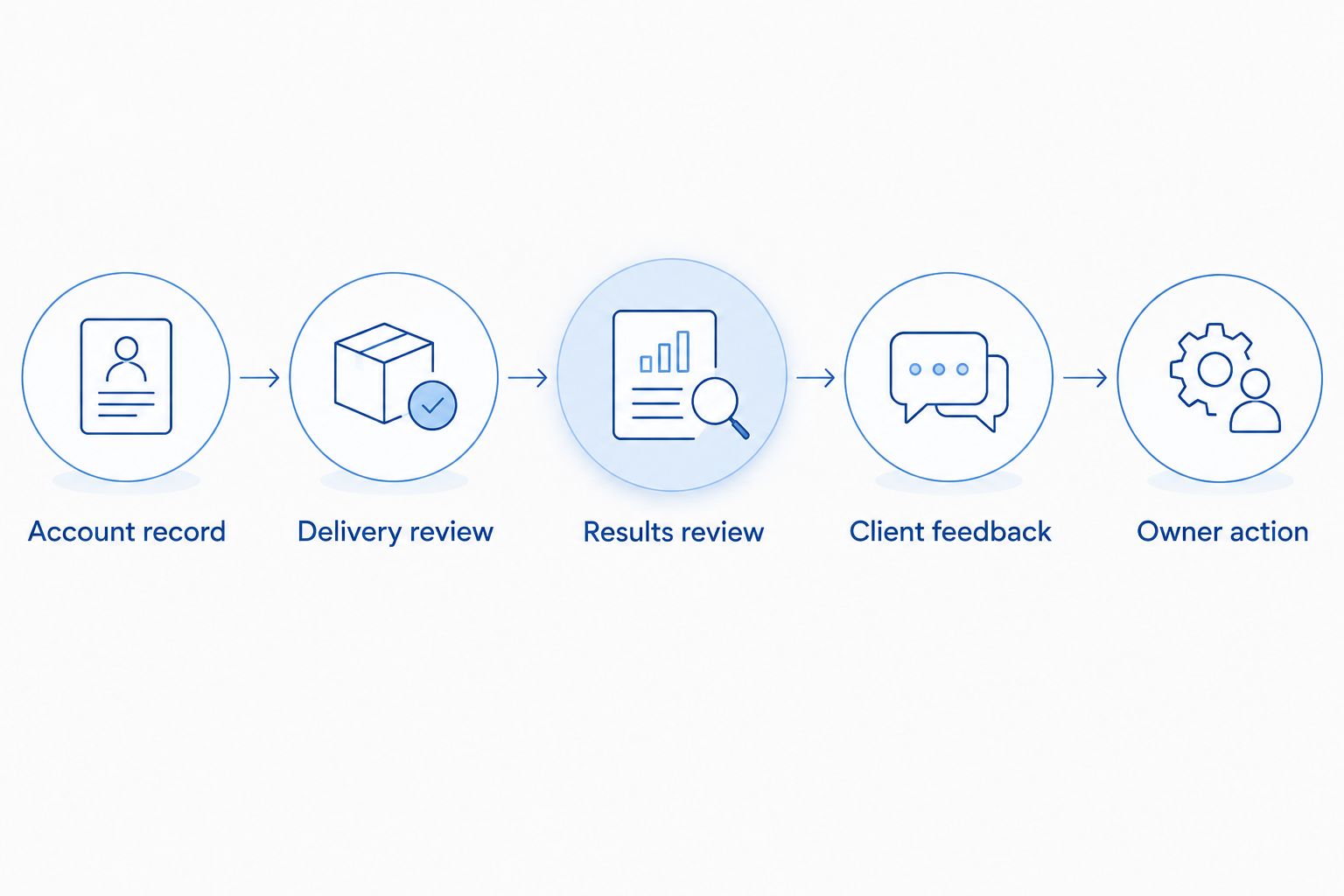
For your 2026 rollout, connect the tools through a clear working sequence. Integration is useful, but the first requirement is ownership.
- Account record: Capture goals, stakeholders, commitments, and the next conversation.
- Delivery review: Check progress and approvals against what the client expects.
- Results review: Explain performance against the agreed objective.
- Client feedback: Ask what is working and what needs attention.
- Owner action: Assign the next step and communicate its status.
A client concern should move through this workflow without becoming an orphaned message. The account manager remains responsible for closing the loop, even when another team owns the fix.
Use a proposed 30-day pilot on an existing account before expanding the workflow. Schedule a 15-minute weekly review of open concerns, then a 60-day follow-up to assess whether the process is being maintained. These are starting cadences, not retention benchmarks.
Keep coaching separate from software selection. Agency Builders Membership offers coaching, masterminds, and retreats for digital and creative agency owners; the software still needs owners, records, and consistent use.
Which client retention tool should you choose?
Choose HubSpot CRM if you need a default starting point for relationship ownership. Choose Asana instead when the relationship record already works but delivery status does not. Choose Teamwork.com when scope conversations lack effort records.
Add Looker Studio for reporting, Google Forms for structured feedback, or Slack for working communication only when that job needs attention. Do not introduce the whole shortlist at once. Each tool should replace a defined gap, not create another place to check.
For owners who need support beyond software, Agency Builders Membership is a separate coaching and peer-support option. Keep the distinction clear: membership supports the owner; the operating process supports the account manager.
FAQ
What's the best client retention tool for agencies in 2026?
HubSpot CRM is the best overall starting point in this shortlist for relationship ownership and follow-up. Choose a different tool when your main problem is delivery visibility, reporting, feedback, or communication.
Is Asana better than HubSpot CRM for account managers?
Asana is better suited to delivery visibility, while HubSpot CRM is better suited to relationship records and commercial follow-up. Choose according to the information your account managers struggle to find.
Can Teamwork.com help account managers control scope?
Teamwork.com provides client work records and time tracking that support scope discussions. Account managers still need to compare the work with the agreed scope and document any change.
Can Looker Studio replace a client review meeting?
Looker Studio cannot replace the judgment and discussion in a client review. Use its reports to explain results, then discuss business context and agree on the next action.
Is Google Forms enough to manage client satisfaction?
Google Forms can collect structured client feedback, but it does not resolve concerns by itself. Assign an owner to each issue and tell the client what happens next.
Should every agency client have a Slack channel?
No, a Slack channel is appropriate only when ongoing chat fits the working relationship. Agree on communication expectations and keep important commitments in a durable account or project record.
Is Agency Builders Membership a client retention software platform?
Agency Builders Membership is a paid membership community for digital and creative agency owners, not a client retention software platform. It offers masterminds, coaching, and in-person retreats.
One last thing
Before adding another tool, open an active client account and ask: Can someone else identify the client's goal, the current concern, and the next commitment without asking the account manager?
If the answer is no, fix the record first. Your 2026 retention stack should make accountability visible—not make an already overloaded account manager check another inbox.